Five new additions to Sequorr this quarter — a quick rundown of what's new.
Sequorr 3.0.5
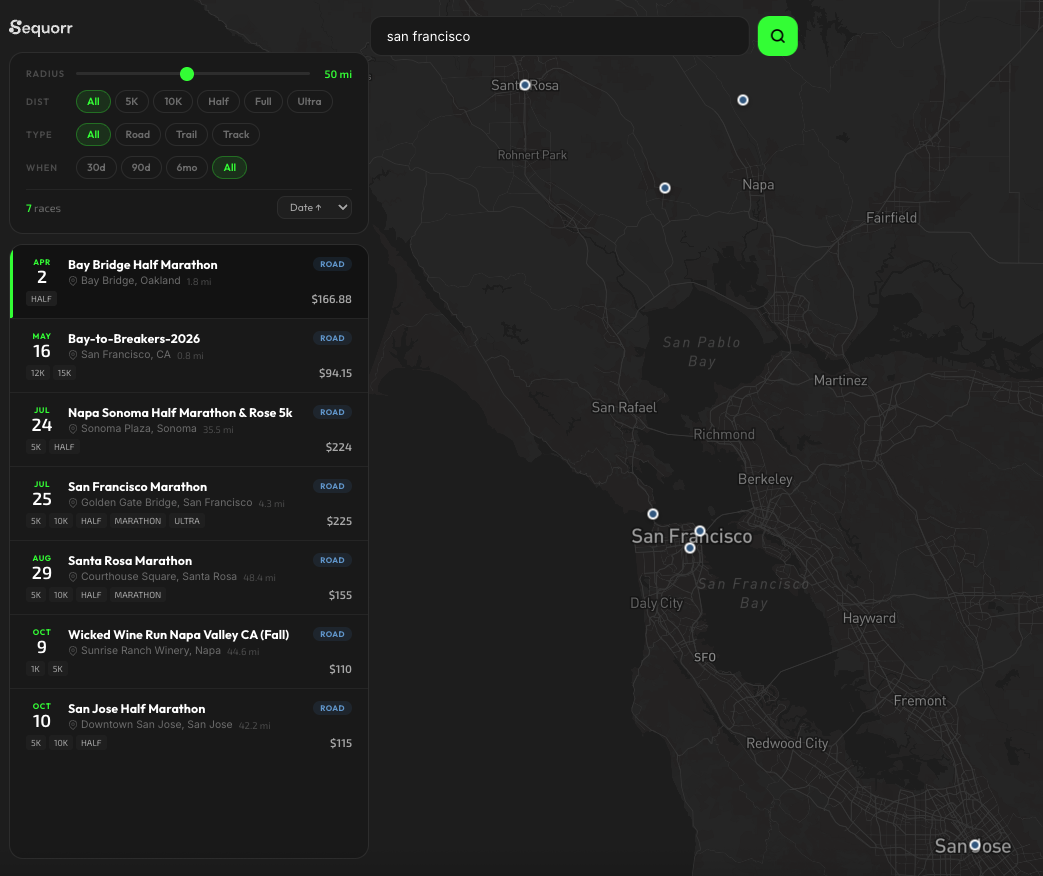
Findrr Goes Global
Findrr began as a United States only race index. It's now expanding internationally. Athletes can search for endurance events beyond the States — more regions, more distances, more terrain types. The index is still growing and every listing is verified before it goes live, but the coverage is no longer limited to one country.
Health Dashboard Expanded
The Health Dashboard now supports a wider historical window for your metrics. Where you previously saw a snapshot of recent data, you can now scroll back through weeks and months of heart rate trends, step counts, sleep data, and VO2 max history. The data still flows from Apple Health — we're just showing more of it and making it easier to spot long-term patterns.
BLE Device Connectivity
Sequorr now supports Bluetooth Low Energy (BLE) heart rate monitors. BLE is the wireless protocol that most chest straps and arm-band HR sensors use to broadcast heart rate data in real time. If you own a COROS HR monitor, a Polar H10, a Garmin HRM, or any standard BLE heart rate sensor, you can pair it directly with Sequorr.
This means you no longer need an Apple Watch to get live heart rate into the app. Pair your BLE device, start an activity, and Sequorr reads your heart rate as the primary data source. If the BLE connection drops, the app falls back to Apple Watch data automatically. No configuration needed — just pair and go.
Switch Your Training Profile Anytime
When you first opened Sequorr you picked one of four training profiles — Road Marathon, Trail Running, Triathlon, or General Endurance. That choice was locked. It isn't anymore. Profile selection has moved into Settings under a new Training Readiness section, and you can switch between the four profiles whenever your goals change.
Switching reconfigures the app immediately. Activity types update, dashboard cards swap to the metrics that matter for your new focus, and the route builder shifts its emphasis. Your activity history, TSS, and CTL/ATL/TSB trends all stay intact — none of that is profile-specific. The profile is a configuration key, not a data model. It only controls what you see and how the app frames your data.
This means Sequorr can follow you through a training arc instead of forcing you to start over. Sign up for your first marathon after a year of general running, move to trail after the marathon, add a triathlon the year after — same account, same history, same intelligence engine, different lens.
Estimate Your Lactate Threshold Heart Rate
The same Training Readiness section now lets you set your Lactate Threshold Heart Rate (LTHR) — the heart rate you can hold for roughly an hour at a hard, sustained effort. LTHR is the anchor Sequorr uses to compute your five training zones and to score the intensity of every workout you log.
You can enter the value directly if you've done a field test or know it from another platform. If you don't, tap Estimate and enter your age — Sequorr applies the standard formula (220 − age, then 92% of that) to give you a starting number. It's a population average, not a measurement, and the sheet says so plainly. A 20-minute all-out field effort will give you a real number once you're ready to do one.
With LTHR set, Sequorr switches to HR-based Training Stress Score — the gold-standard formula. That number feeds your fitness (CTL), fatigue (ATL), and form (TSB) trends, so the more accurate your LTHR, the more accurate your readiness picture becomes. Without it, Sequorr falls back to pace-based or duration-based estimates — workable, but coarser.